Installation
This page explains how to install Untold Engine Studio, the recommended way to get started with Untold Engine.
Untold Engine Studio is a downloadable app that includes:
- The Untold Engine runtime
- The Untold Editor for building and editing games
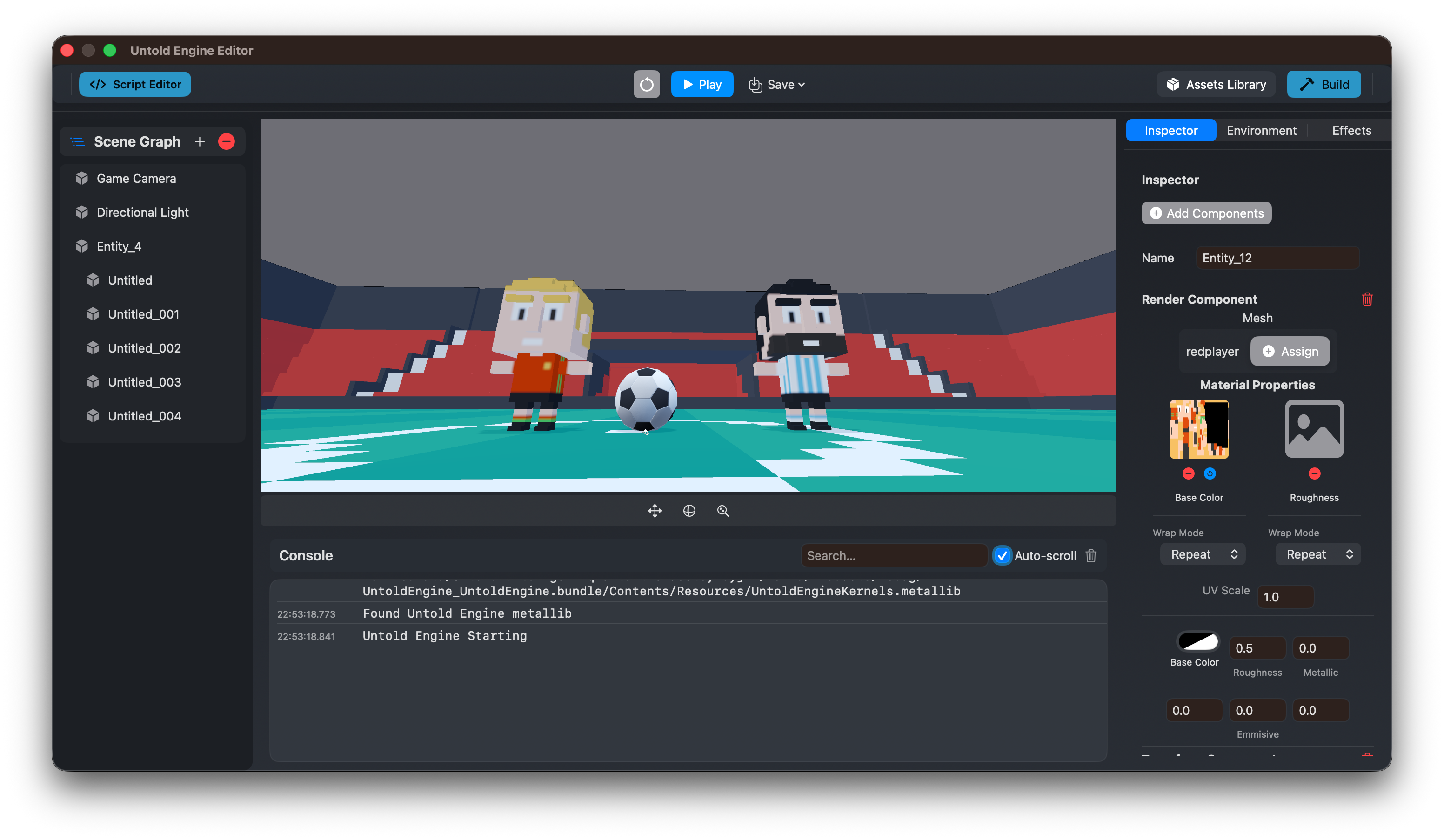
If your goal is to make games, this is the only installation you need.
Recommended Installation (Untold Engine Studio)
1. Download
Download the latest version of Untold Engine Studio from the official website:
The download is provided as a .dmg file for macOS.
2. Install
- Open the downloaded
.dmgfile - Drag Untold Engine Studio into your
Applicationsfolder - Launch the app from
Applications
No additional setup is required.
3. First Launch
On first launch, Untold Engine Studio will:
- Initialize the engine runtime
- Set up the editor environment
- Prompt you to create or open a project
From here, you can immediately:
- Create scenes visually
- Import 3D models and assets
- Write game logic (Swift in Xcode or USC scripts)
- Build and test your game
System Requirements
- macOS (Apple Silicon recommended)
- Metal-capable GPU
- Keyboard and mouse
What You Get
By installing Untold Engine Studio, you get:
- A complete game development environment
- Visual editor for scenes, assets, and scripts
- Full Untold Engine Swift API for game logic in Xcode
- USC scripting system (experimental component-based scripting)
- Build and run support for macOS, iOS, and visionOS
You do not need to install the engine or editor separately.
Two Ways to Write Game Logic
Untold Engine Studio supports two approaches for writing gameplay code:
1. Swift in Xcode (Recommended)
- Write game logic in
GameScene.swiftusing the full Untold Engine API - Complete control over game systems and performance
- Best for complex games and experienced developers
- Works seamlessly with Xcode debugging and profiling
2. USC Scripts (Experimental)
- Component-based scripting attached to entities
- Write gameplay behaviors in the integrated script editor
- Good for prototyping and simple game mechanics
- API is experimental and subject to change
You can use both approaches in the same project.
Alternative Installation: CLI Workflow
For advanced users or those who prefer a command-line workflow without the visual editor, you can install the CLI tools.
When to Use CLI
- You prefer working entirely in Xcode without a visual editor
- You want to script project creation and automation
- You're building tools or integrations on top of UntoldEngine
CLI Installation
1. Clone the repository:
git clone https://github.com/untoldengine/UntoldEngine.git
cd UntoldEngine
2. Install the CLI globally:
./scripts/install-create.sh
3. Verify installation:
untoldengine-create --version
untoldengine-create --help
CLI Quick Start
After installing the CLI, create a project from anywhere:
# 1. Create project directory
cd ~/anywhere
mkdir MyGame && cd MyGame

# 2. Create the project
untoldengine-create create MyGame

# 3. Open in Xcode
open MyGame/MyGame.xcodeproj
For complete CLI documentation, see Tools/UntoldEngineCLI/README.md in the repository.
What You Get
The CLI creates a complete, ready-to-run project:
- Xcode project - Configured and ready to build
- GameScene.swift - Your game logic goes here
- GameViewController.swift - Renderer and view setup
- GameData/ directory - All game assets location
- Platform-specific files (AppDelegate, Info.plist, etc.)
Project Structure
MyGame/                          # Your working directory
└── MyGame/                      # Generated project
    ├── MyGame.xcodeproj         # Open this in Xcode
    ├── project.yml              # XcodeGen configuration
    └── Sources/
        └── MyGame/
            ├── GameData/        # ← Put your assets here
            │   ├── Models/      # 3D models
            │   ├── Scenes/      # Scene files
            │   ├── Scripts/     # USC scripts
            │   ├── Textures/    # Images
            │   └── ...
            ├── GameScene.swift          # Your game logic
            ├── GameViewController.swift # View controller
            └── AppDelegate.swift        # App entry point
Platform Support
The CLI supports multiple platforms:
# macOS (default)
untoldengine-create create MyGame --platform macos

# iOS
untoldengine-create create MyGame --platform ios

# iOS with ARKit
untoldengine-create create MyGame --platform iosar

# visionOS (Apple Vision Pro)
untoldengine-create create MyGame --platform visionos
Development Workflow
- Write code in GameScene.swift (game logic)
- Add assets to the GameData/ directory
- Build & run in Xcode (Cmd+R)
- Iterate - make changes and rebuild
For complete CLI documentation, see Tools/UntoldEngineCLI/README.md in the repository.
Preloaded Assets
To kickstart development, download prebuilt demo assets:
- Models: Soccer stadium, player, ball, and more
- Animations: Running, idle, and other character motions
- Textures: Sample materials
Extract and copy into your project's GameData/ directory.