Blender Add-On Workflow
The Blender add-on exports Blender scenes into Untold Engine's .untold runtime
format. Use it when you want a visual authoring workflow for models,
animations, and tiled scenes.
Install The Add-On
For normal use, download untold_exporter.zip from the same GitHub release as
the engine/editor version you are using.
In Blender:
- Open
Edit > Preferences > Add-ons. - Click
Install.... - Select
untold_exporter.zip. - Enable
Untold Engine Exporter.
The add-on adds:
File > Export > Untold (.untold)File > Export > Untold Animation (.untold)File > Export > Untold Tiled Scene
If you are developing from a repository checkout, build the zip with:
Then install scripts/untold-blender-addon/build/untold_exporter.zip as mentioned above.
Export A Model
Use File > Export > Untold (.untold).
If you export:
the add-on writes:
Load the exported model in the engine with:
let entity = createEntity()
setEntityName(entityId: entity, name: "Retro Camera")
setEntityMeshAsync(entityId: entity, filename: "RetroCameraBlender", withExtension: "untold") { success in
    setSceneReady(success)
}
Export Animation
Use File > Export > Untold Animation (.untold).
The animation exporter can use:
- the selected armature
- the armature linked to a selected mesh
- the only visible armature in the scene
At runtime, load the mesh first, then register clips:
setEntityAnimations(entityId: character, filename: "idle", withExtension: "untold", name: "idle")
setEntityAnimations(entityId: character, filename: "running", withExtension: "untold", name: "running")
changeAnimation(entityId: character, name: "idle")
Treat the loaded asset root as the animation handle for multi-mesh rigged assets.
Export A Tiled Scene
Use File > Export > Untold Tiled Scene.
The add-on writes a manifest plus tile payloads:
Load the manifest with:
let sceneRoot = createEntity()
setEntityName(entityId: sceneRoot, name: "City")

setEntityStreamScene(entityId: sceneRoot, manifest: "CityBlender", withExtension: "json") { success in
    setSceneReady(success)
}
For remote hosting, pass a manifest URL instead:
Preview Tiles Before Export
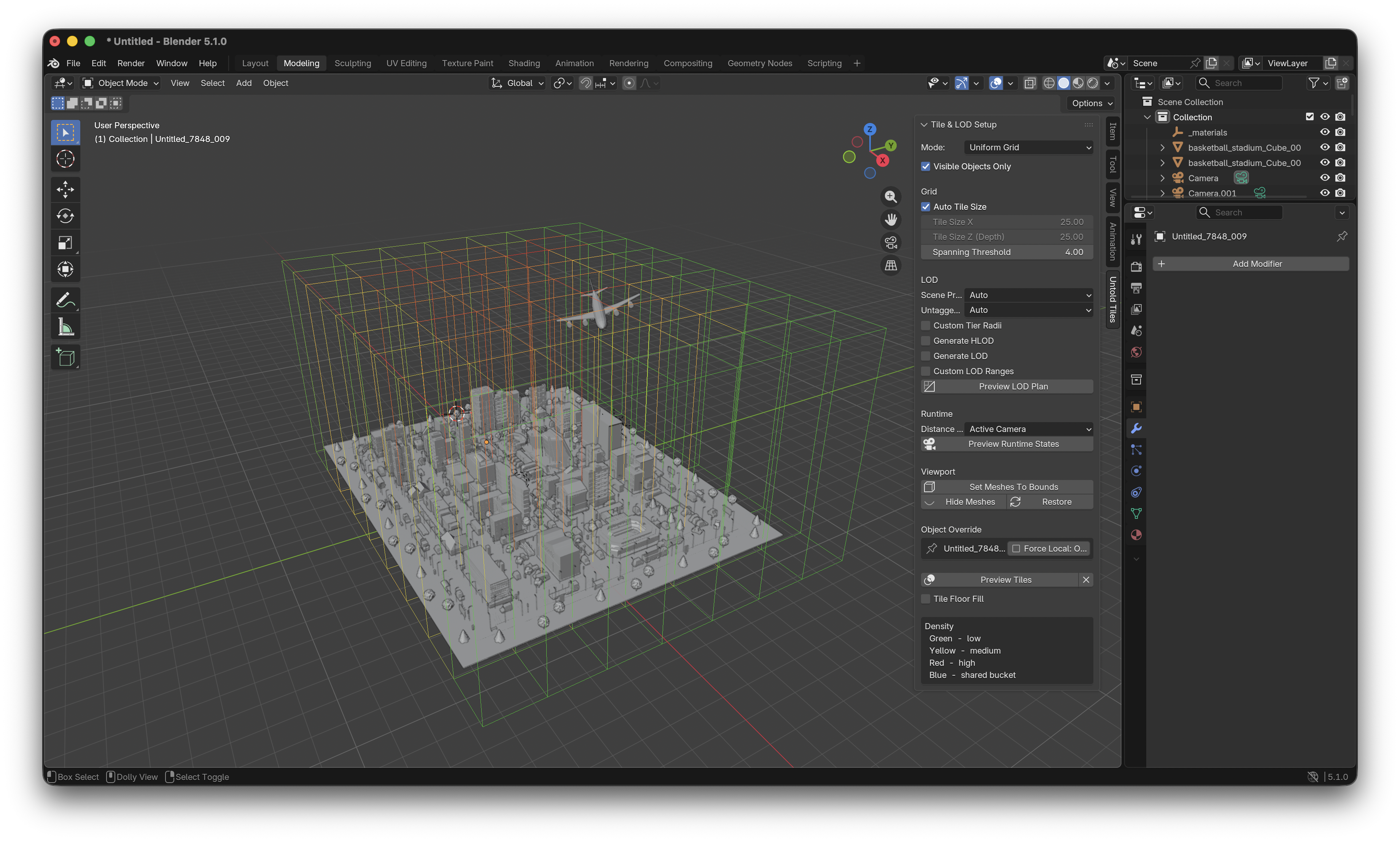
Open the 3D viewport sidebar with N, then use the Untold Tiles tab.
Use Preview Tiles to inspect the partition. Density colors indicate how much
geometry lands in each tile. Use Preview Runtime States to simulate which
representation would be active near the camera, 3D cursor, or selected object.
Start with:
Quadtreefor multi-floor buildingsUniform Gridfor simple outdoor scenesKD-Treewhen geometry is clustered unevenly
Enable HLOD/LOD generation only when the preview shows a useful runtime distance plan.
Author Export Hints
Select a mesh and open Object Properties > Untold to set export hints:
Object Semantic: exterior shell, structural interior, room contents, fine propsPriority Hint: low, normal, high, criticalForce Local: keep an object in a local tile instead of the shared bucket
For selectable entities, use the naming workflow from scene channels. Objects
with the NM_ prefix remain selectable and preserve identity after export.
For window/channel workflows, use project prefixes such as: